Showing posts with label Tricks. Show all posts

How To Get Google Play Store App 4.0.2.5

Google-Play-4.0.25-Nexus-4


Google has came forward with a brand new app for Google Play which includes the updates in the UI and Functionality of the Google's Play store. Updates of the App has Already been started and Google Says that everyone should get this app with in some days. We have covered a lot more points about its functionality in my this post.

You can download Google Play App from Give link rather waiting for its launch in Google Play store. This is an official app from Google. you can download and enjoy this app.


Like i already main focus in this update is on UI , with this improved UI App discovery is really easy because current layout is a content-focused design. The Card view of apps makes things much more beautiful and easy for users. There is appropriate information about any app on the card.

Google Worked out well on Play store to make things much more easier for the users. Like if you want to make an in-app purchase. There will be a dialog box poped out, and you can easily make an payment. On the other hand if you want to make an in-app purchase then you would have taken to the play store and then you can make any payment till then your app will be in the background.

Google-Play-4.0.25-Nexus-4-In-App-Purchase

If you are using play store in tables the UI looks really great. it will look more handy and beautiful on tablet then any smartphone.

Google-Play-4.0.25-Nexus-10-Books
if you want to download and install Google Play App you should have to download APK file of the Play store and then you can install it on your android device. This is an official app from Google. Just download and enjoy. If further updates will be make then you will be able to update your this app.


How to Recover Deleted Files without Using Software


In this post I'm gonna discuss an easiest Data Recovery Method.

How to Recover Deleted Files without Using Software
Sometimes we might have delete some important files accidentally and we need them back.
Today I'll show you a trick to recover your deleted files without using any 3rd party software. I'm not talking about restoring files from recycle bin.
This simple trick mostly works on Vista versions and all the Windows 7 versions.


So let's see how to recover deleted file without using any software 

For example lets assume that you have permanently deleted "My Sweet Heart.JPG" from the folder named "My LIFE" ;) , and now you want to recover "My Sweet Heart.JPG" back.
Do this simple trick to recover your Sweet Heart.JPG
Right Click on the particular folder
Select "Restore previous versions"

How to Recover Deleted Files without Using Software


That's all, now you will see a option to recover the particular file.

How to Recover Deleted Files without Using Software


If you don't see "Restore previous Versions" by Right Clicking, Go to
Control Panel -->
System and Secutiry -->
System -->
Click on System Protection (in left sidebar) -->
Select the particular drive and Click Configure -->
Then select "Restore system setting and previous versions of files" -->
Now Click on OK
Note : 
Previous versions come from restore points or from windows backup.
This trick will not work at all the time.

How to Watch YouTube Videos in Slow Internet Connection


How to Watch YouTube Videos in Slow Internet Connection

YouTube is the largest video sharing website. Currently it consists millions of videos. While watching YouTube videos, the most common problem is slow buffering. If u are having a low band width internet connection you will face this irritation. Are you disappointed of YouTube video slow buffering? Here is the solution i have. 


You can speedup video buffering with YouTube feather beta. This helps you to load YouTube video more faster than stranded mode. YouTube Feather removes all the information panel, sidebar related video list, share button, comment, Like and dislike button etc... from YouTube video page. So now YouTube video will load more faster than before on your low band width internet connection

How to do this?

Go to YouTube Feather Beta page.
Click on the "Join Feather Beta"

How to Watch YouTube Videos in Slow Internet Connection

That's all, now YouTube Feather beta will be enabled on your YouTube account.

Talking Tom Cat for Pc free Online


Talking Tom Cat 2


MS DOS COMMANDS LIST FOR WINDOWS XP AND 7 FREE DOWNLAOD


MS DOS Commands list for Windows XP and 7 Free Downlaod


An A-Z Index of the Windows XP and 7 command line
a
   ADDUSERS       Add or list users to/from a CSV file
   ARP                      Address Resolution Protocol
   ASSOC                Change file extension associations•
   ASSOCIAT         One step file association
   ATTRIB               Change file attributes
b
   BOOTCFG         Edit Windows boot settings
   BROWSTAT      Get domain, browser and PDC info
c
   CACLS                 Change file permissions
   CALL                     Call one batch program from another•
   CD                        Change Directory - move to a specific Folder•
   CHANGE             Change Terminal Server Session properties
   CHKDSK             Check Disk - check and repair disk problems
   CHKNTFS            Check the NTFS file system
   CHOICE             Accept keyboard input to a batch file
   CIPHER              Encrypt or Decrypt files/folders
   CleanMgr         Automated cleanup of Temp files, recycle bin
   CLEARMEM     Clear memory leaks
   CLIP                    Copy STDIN to the Windows clipboard.
   CLS                      Clear the screen•
   CLUSTER           Windows Clustering
   CMD                   Start a new CMD shell
   CMDKEY           Manage stored usernames/passwords
   COLOR               Change colors of the CMD window•
   COMP                Compare the contents of two files or sets of files
   COMPACT        Compress files or folders on an NTFS partition
   COMPRESS      Compress individual files on an NTFS partition
   CON2PRT          Connect or disconnect a Printer
   CONVERT          Convert a FAT drive to NTFS.
   COPY                  Copy one or more files to another location•
   CSCcmd              Client-side caching (Offline Files)
   CSVDE                 Import or Export Active Directory data
d
   DATE                    Display or set the date•
   DEFRAG               Defragment hard drive
   DEL                         Delete one or more files•
   DELPROF            Delete NT user profiles
   DELTREE             Delete a folder and all subfolders
   DevCon               Device Manager Command Line Utility
   DIR                      Display a list of files and folders•
   DIRUSE               Display disk usage
   DISKCOMP       Compare the contents of two floppy disks
   DISKCOPY        Copy the contents of one floppy disk to another
   DISKPART         Disk Administration
   DNSSTAT          DNS Statistics
   DOSKEY             Edit command line, recall commands, and create macros
   DSACLs              Active Directory ACLs
   DSAdd               Add items to active directory (user group computer)
   DSGet                 View items in active directory (user group computer)
   DSQuery             Search for items in active directory (user group computer)
   DSMod                 Modify items in active directory (user group computer)
   DSMove               Move an Active directory Object
   DSRM                   Remove items from Active Directory
e
   ECHO                                     Display message on screen•
   ENDLOCAL End   localisation of environment changes in a batch file•
   ERASE                    Delete one or more files•
   EVENTCREATE    Add a message to the Windows event log
   EXIT                        Quit the current script/routine and set an errorlevel•
   EXPAND              Uncompress files
   EXTRACT            Uncompress CAB files
f
   FC                        Compare two files
   FIND                     Search for a text string in a file
   FINDSTR            Search for strings in files
   FOR /F               Loop command: against a set of files•
   FOR /F               Loop command: against the results of another command•
   FOR                      Loop command: all options Files, Directory, List•
   FORFILES          Batch process multiple files
   FORMAT           Format a disk
   FREEDISK          Check free disk space (in bytes)
   FSUTIL               File and Volume utilities
   FTP                      File Transfer Protocol
   FTYPE                  Display or modify file types used in file extension associations•
g
   GLOBAL                Display membership of global groups
   GOTO                   Direct a batch program to jump to a labeled line•
   GPUPDATE      Update Group Policy settings
h
   HELP                    Online Help
i
   iCACLS               Change file and folder permissions
   IF                       Conditionally perform a command•
   IFMEMBER       Is the current user in an NT Workgroup
   IPCONFIG         Configure IP
k
   KILL                     Remove a program from memory
l
   LABEL                  Edit a disk label
   LOCAL                Display membership of local groups
   LOGEVENT       Write text to the NT event viewer
   LOGMAN          Manage Performance Monitor
   LOGOFF            Log a user off
   LOGTIME           Log the date and time in a file
m
   MAPISEND       Send email from the command line
   MBSAcli            Baseline Security Analyzer.
   MEM                    Display memory usage
   MD                      Create new folders•
   MKLINK               Create a symbolic link (linkd)
   MODE                  Configure a system device
   MORE                   Display output, one screen at a time
   MOUNTVOL    Manage a volume mount point
   MOVE                Move files from one folder to another•
   MOVEUSER     Move a user from one domain to another
   MSG                   Send a message
   MSIEXEC            Microsoft Windows Installer
   MSINFO            Windows NT diagnostics
   MSTSC               Terminal Server Connection (Remote Desktop Protocol)
   MUNGE            Find and Replace text within file(s)
   MV                      Copy in-use files
n
   NET                      Manage network resources
   NETDOM           Domain Manager
   NETSH                 Configure Network Interfaces, Windows Firewall & Remote access
   NETSVC               Command-line Service Controller
   NBTSTAT            Display networking statistics (NetBIOS over TCP/IP)
   NETSTAT             Display networking statistics (TCP/IP)
   NOW                  Display the current Date and Time
   NSLOOKUP      Name server lookup
   NTBACKUP      Backup folders to tape
   NTRIGHTS        Edit user account rights
o
   OPENFILES       Query or display open files
p
   PATH                  Display or set a search path for executable files•
   PATHPING       Trace route plus network latency and packet loss
   PAUSE                 Suspend processing of a batch file and display a message•
   PERMS                Show permissions for a user
   PERFMON         Performance Monitor
   PING                                    Test a network connection
   POPD                  Restore the previous value of the current directory saved by PUSHD•
   PORTQRY         Display the status of ports and services
   POWERCFG     Configure power settings
   PRINT                  Print a text file
   PRINTBRM       Print queue Backup/Recovery
   PRNCNFG         Display, configure or rename a printer
   PRNMNGR       Add, delete, list printers set the default printer
   PROMPT           Change the command prompt•
   PsExec               Execute process remotely
   PsFile                 Show files opened remotely
   PsGetSid          Display the SID of a computer or a user
   PsInfo                 List information about a system
   PsKill                  Kill processes by name or process ID
   PsList                 List detailed information about processes
   PsLoggedOn    Who's logged on (locally or via resource sharing)
   PsLogList          Event log records
   PsPasswd          Change account password
   PsService          View and control services
   PsShutdown   Shutdown or reboot a computer
   PsSuspend       Suspend processes
   PUSHD              Save and then change the current directory•
q
   QGREP                Search file(s) for lines that match a given pattern.
r
   RASDIAL            Manage RAS connections
   RASPHONE      Manage RAS connections
   RECOVER          Recover a damaged file from a defective disk.
   REG                     Registry: Read, Set, Export, Delete keys and values
   REGEDIT             Import or export registry settings
   REGSVR32        Register or unregister a DLL
   REGINI               Change Registry Permissions
   REM                    Record comments (remarks) in a batch file•
   REN                      Rename a file or files•
   REPLACE           Replace or update one file with another
   RD                       Delete folder(s)•
   RMTSHARE      Share a folder or a printer
   ROBOCOPY      Robust File and Folder Copy
   ROUTE                Manipulate network routing tables
   RUNAS              Execute a program under a different user account
   RUNDLL32        Run a DLL command (add/remove print connections)
s
   SC                        Service Control
   SCHTASKS        Schedule a command to run at a specific time
   SCLIST                 Display NT Services
   SET                     Display, set, or remove environment variables•
   SETLOCAL         Control the visibility of environment variables•
   SETX                    environment variables permanently
   SFC                       System File Checker
   SHARE               List or edit a file share or print share
   SHIFT                 Shift the position of replaceable parameters in a batch file•
   SHORTCUT       Create a windows shortcut (.LNK file)
   SHOWGRPS    List the NT Workgroups a user has joined
   SHOWMBRS   List the Users who are members of a Workgroup
   SHUTDOWN   Shutdown the computer
   SLEEP                 Wait for x seconds
   SLMGR               Software Licensing Management (Vista/2008)
   SOON                 Schedule a command to run in the near future
   SORT                   Sort input
   START                Start a program or command in a separate window•
   SU                       Switch User
   SUBINACL        Edit file and folder Permissions, Ownership and Domain
   SUBST                Associate a path with a drive letter
   SYSTEMINFO List system configuration
t
   TASKLIST           List running applications and services
   TASKKILL           Remove a running process from memory
   TIME                   Display or set the system time•
   TIMEOUT          Delay processing of a batch file
   TITLE                   Set the window title for a CMD.EXE session•
   TLIST                   Task list with full path
   TOUCH              Change file timestamps   
   TRACERT           Trace route to a remote host
   TREE                    Graphical display of folder structure
   TYPE                   Display the contents of a text file•
   TypePerf          Write performance data to a log file
u
   USRSTAT           List domain usernames and last login
v
   VER                     Display version information•
   VERIFY               Verify that files have been saved•
   VOL                     Display a disk label•
w
   WHERE               Locate and display files in a directory tree
   WHOAMI         Output the current UserName and domain
   WINDIFF           Compare the contents of two files or sets of files
   WINMSD          Windows system diagnostics
   WINMSDP        Windows system diagnostics II
   WINRM              Windows Remote Management
   WINRS               Windows Remote Shell
   WMIC                WMI Commands
x
   XCACLS             Change file and folder permissions
   XCOPY               Copy files and folders

How to Login to Multiple Facebook Accounts with Google Chrome [Easy]


You need sometimes to open multiple facebook accounts in the same time, so you use different Web Browsers or you Logout from your first account and login to your second account. This method will show you How to Login to Multiple Facebook Accounts at Once using Only Google Chrome.


1) Login to your First Facebook Account as always.

2) Now Click the Wrench to bring Google Chrome options, and Click New incognito window (or Press Ctrl+Shift+N)
3) By clicking New incognito window it will bring you a new private window that stores all cookies apart (cookie don't collapse with the first account's cookie) You'll notice a secret agent in the top left corner of Google Chrome.
4) Go to Facebook.com in the new private window, and Login to your second account as always.
NB: This method works also for: Gmail, Hotmail, Yahoo Mail, Twitter and many other accounting websites

CreditMaster v2.0


CreditMaster v2.0


 (2272 lines of source code, compiled to 23117 executable)
   (1373 Bank Index Numbers (BIN), or prefixes, in database (90618 bytes data))
   - A public domain release, with no serialization.
   - Allowed generation of up to 999 cards, as opposed to a maximum of only 99
     allowed in v1.0.
   - Allowed extrapolation of up to 999 cards, as opposed to a maximum of only
     99 allowed in v1.0.
   - Allowed use of prefix lengths from 1 to 6, as opposed to the standard of 4
     in v1.0.
   - Fixed small extrapolate display bug (extra line printed when card length
     was 16).
   - Internet address displayed in exit screen.
   - Allowed output of PGP public encryption key to file of user's choice, for
     use in encrypting sensitive materials when mailing to Internet address.
   - Option added to Setup menu in which the user can change the character
     separating the groups of a credit card. Later, a filter would be put on
     the characters allowed to be used.
   - Added 'F'ind and 'N'ext functions, which allowed the user to search for a
     specific keyword (non case-sensistive) from the prefix list while
     generating cards. 'F'ind asks for a keyword, 'N'ext continues the search.
   - "/MONO" parameter added, so that users with only a Black & White or
     Monochrome monitor can still use the program without losing characters
     or having those annoying underlines popping up.
   - "/SNOW" parameter added, which enables snow checking for old CGA monitors.
     Snow checking will only make direct screen writes during horizontal
     retrace intervals on CGA machines. Default is no snow checking, which will
     significantly speed up writes made directly to video memory on newer CGA
     machines.
   - "/F" parameter changed to "/FLASH"
   - Fixed bug in which pauses didn't flush the keyboard buffer.
   - Ctrl-Break keyboard interrupt intercepted and ignored.
   - Direct video writes used for faster screen displaying.
   - Various small changes, most made for their asthetic value.
   - Code largely optimized for increased speed and performance.
   - Program placed in a non-standard undecryptable format, so as to make
     reverse-engineering more difficult.

CreditMaster v1.0 - Released April 18, 1993
   (1657 lines of source code, compiled to 20240 executable)
   - Initial version completed. All who asked for a copy (and gave us a data or
     voice number to contact them at) recieved their own personalized version
     with their handle and serial number hard-coded within the program.
   - Less than 30 copies of v1.0 in existance. If you've got one, it's a
     collector's item!
   - "/F" paramater added as a last-minute change. It gave the pause strings a
     bouncing color effect.

Download Link :-
==========================

SAM History n Hacking


SAM History n Hacking
1-Introduction
This article introduce very simple way to get Administrator like account and do the job and after finish recover your way, after that Get Admin Password later in your home by Cracking, After get the Admin Password Create a hidden user account and do all your jobs free, and Explain how to make a USB Storage Device Bootable corresponding to any system boot, and how to bypass Mother Board password by Default Passwords, and how to extract it if you are in the system


2-To Hackers / Security Systems Engineers


First All must know that both Hackers / Security Systems Engineers Are 2 faces to the same coin Any way, I try this on Windows XP SP2 I want all to try it on Windows Server 2003, Windows Vista Any Windows NT and POST a Message to make all know what versions exactly this idea can apply for

3-Close Look to hole

Microsoft stores all Security Information in many files but the main file is the SAM file (Security Accounts Manager)! this file contain critical information about users account you can explore the folder

$windir$\system32\config

You will find all things and may discover some thing new, but what amazing here is that the file is available, so we can apply our idea

shot1

You will Not be able To copy them Under XP

4-Dose Microsoft Know and Why!?

Yes Microsoft Know all things, and done on purpose why? I always for many years ask my self why Microsoft doesn’t do real security on their systems from the CD setup to all security aspects In the system, I found(my opinion may wrong)that they need to achieve 2 strategic things


1-They need their software spread and all depend on it and in one day when they feel that they are the One The security will done and all money will go to One Pocket


2-They Forced/Like to Make Some Organizations Hack other systems


Proof:

They can make this File SAM Unavailable by storing the information in FAT, FAT32, NTFS Areas (Sectors reserved by The Operating SYSTEM to Store the Addresses of the files on the HardDisk File Allocation Table) So that it is hard to extract. But they don't!!!!!

5-Understand the Idea

The Idea is simple I will explain it manually and it can then be programmed it is so easy here is the idea


The SAM file is available and the SAM file contain a Security Information, so I created a Free Windows XP SP2 Logon account (Administrator Account without password) that means when windows Lunch it Will enter directly to the system without asking about any password And windows will store this Account in The SAM file on My PC So the SAM file on My PC contain an Account will Make you enter Directly to the Windows, so I will take My SAM File and Replace (by renaming, we will need the original file to recover our way) It with the other SAM File in The Other System or Machine So When you restart It will make you enter directly to the Windows With Administrator Like Account ,do what you need and then back all things to the previous state. All These Steps will be under other system bootable DOS, Knoppiex, Windows Live CD, Because Windows XP will not make u able to copy the Files

6-Get Admin Like Account (The Simple Way)


1- Download My 2 SAM files I Include them in Downloads

2- Go to the target Machine , and try to Access it and Boot from any device CD-ROM, Floppy, NIC if it haven't any of those Read Hint 9

3- After Get Access to the Boot Command prompt c:> or Boot Live OS CD, Go to the windows folder $windir$\system32\config And Copy the SAM File and System File (we will need it later) To other folder, Then go to $windir$\repair copy SAM file

And then Rename the 2 SAM Files to SAM1 in their original places

4- Copy My SAM/config File and Paste it in the windows folder $windir$\system32\config Copy My SAM/Repair File and Paste it in the windows folder $windir$\repair (may this step not required)

5- Reboot and Make windows enter Normally

6- Yeah, No You are in The System

7- Copy the files in step 3 to Floppy Disk or Flash Stick Or Send it to your mail via Internet

8- After finish repeat step 2 and delete My SAM files and Rename Both SAM1 to SAM

9- Reboot , Congratulation you recover your way

7-Crack the SAM-Know the real Admin Password and Apply Hint 8

There is many ways I will introduce 2 ways and explain 1 After you get the SAM File and System File there are Programs That extract the Accounts and their passwords, depending on the idea of cracking the HASH (the HASH is one way encryption method) so that The program will generate random passwords and convert them to HASH and then compare it with the HASHES in the SAM File , so it may take a long time but for fast you will pay more money for ready made HASHES with their user names and passwords the 2 program are


1-L0phtcrack v4.0 (LC4 alternate name) the most famous on the NET

2-SAMInside http://www.insidepro.com/I include on the Downloads


I will explain fast SAMInside


shot1


This is the main window press Ctrl+O or by mouse click Import SAM and SYSTEM


shot1


Window will open to import the 2 files and the program will start to crack the Accounts and get them, and then display users names and their passwords


Any other tool will do the job try all and select your best I Explain here SAMInside because he give me results with 6 character only password and get it FAST

8-Creat a Hidden User Accountn

Windows NT / Windows 2000 and Windows XP has a security setting to hide accounts from the Logon Screen/Control panel users accounts


shot1

Press

Ctrl+Alt+Delet

Give you another Access Dialog


Steps:


1-After getting Admin Password enter to the system

2-create an Account with password

3-click start - > Run - > type Regedit press Enter

4-Go to

HKEY_LOCAL_MACHINE\SOFTWARE\Microsoft\WindowsNT\ CurrentVersion\Winlogon\SpecialAccounts\UserList


shot1


5- Create a new DWORD Value on the UserList

6-Name it with Name of Account to be Hidden

7-set the Value Data of this DWORD Value to 0 to hide it /1 to appear it

8- close Regedit and Reboot

9- Press Ctrl+Alt+Delete when logon Screen Appear another login dialog appear type You hidden user name and password and press Enter


Note:


1- the account profile will be visible in \Documents and Settings, But it will be hidden from Logon Screen and User Account in the control panel


2-there is other method that Inject your Account directly to the Admin SAM without know the Admin Pass, but believe me you don't Expect the result, so if you want try it (if the password hard to get)

9-USB Boot for FAT32, NTFS or any File System


HP Always amazing me to do this we need 2 tools


1- HP USB Disk Storage Format Tool v 2.0.6 I include in Downloads If u want to find more go to http://www.hp.com/

2- NTFSDOS Professional Boot Disk Wizard I include in Downloads If u want to find more go to http://www.winternals.com/


shot1


Just connect your USB Storage

steps:

1- Prepare a Startup Disk or Startup CD , Or any Equivalent

2- In the HP tool select the Device->your USB Storage

3- Select File System FAT or FAT32

4- Check "create a DOS startup disk" checkbox and then select option "using DOS System Files Located at"

5- brows your location

6- Click Start

7- Now you have a Bootable USB Storage Device

8- Now in the NTFSDOS Professional Boot Disk Wizard follow the wizard and you will get a NTFS bootable USB Storage


Why we need NTFS ?

If the Partition of the Windows System is NTFS so with normal Startup you will not be able to access any files because the File System is not Recognized by MS-DOS when we install NTFSDOS Professional on the bootable disk it will allow you To Access any File Under NTFS

Ab free un site per jayen jo un-register user ko Access nain karti..!


Kuch Sites aisi hoti hain jin main hum baghair register huwe enter nahin ho sakte but i have a trick jis ki wajah se ap baghair register huwe enter ho sakte ain..!!!


Go to

-http://bugmenot.com/

and type the URL of the website you want to log into.
Examples:

-http://www.nytimes.com/, -http://www.winnetmag.com/
etcetera.

Another (and better) way is changing the user agent of your browser to:
Googlebot/2.1+

-http://www.googlebot.com/bot.html

This is very easy in Mozilla's Firefox. Download and install the User Agent Switcher from

-http://www.chrispederick.com/work/firefox/useragentswitcher/
and add the Googlebot user agent.


Have fun, Dead Dreamer!

-]Edit[- Now this kicks ass, was just browsing entire forum without
even needing to login to view restricted areas, and it works on other sites
And no, you cant access the hidden forums either, already tried that

School , NetCafe , University , Lab ke Computers Remotely Shutdown karen..!


:::: Very CoOoOL pRANk And AlsO Funny But this is Only for Educational purpose Only ::::

Requirements::

- The school must be connected with a LAN Network
- You have to be able to create .txt files and save them to .bat files. (Most schools don't block this)


1) Right-click on your desktop. Navigate to "New" and then to "Text Document"

2) Open the Document and type:

Spoiler:
Quote:
shutdown.exe -i


Save the .txt file as a .bat file.

3) Open the .bat file. "Remote Shutdown Dialog" should pop up when you open it.

4) Click "Browse...". All computers connected to your LAN Connection should be in the list. When you do this in school, you can target specific rooms if the school admin organized the computers. In my school, I can search for "LIB" and all the computers in the library will be in the list.

5) After you find the name, click "Add..." and type the computers name (EXACTLY), and hit "OK".

6) Now, you have a few options before you make their computer shutdown. You can make their computer: Shutdown, Logoff, or Restart.
After you picked the type of shutdown you want to do, you can choose how long the message will stay up for. Default on my computer is 20 seconds. <- If you don't want to be caught, set it to a low number so they can't see who forced the shutdown.

7) Set a comment! You can type in the "Comment" box to make the shutdown dialog say something. For example, if you type "You are stupid" in the comment box, the shutdown dialog will say at the bACottom "You are stupid".

How To Find Facebook Profile and Page Through Picture Link


Facebook is the No.1 Social Networking website and Provides lots of new features like Support board, And today Facebook reveals 2012 year in review [Here It will show your all facebook activities of year 2012].


How to find Profile and Facebook fan Page from a picture url

Copy any picture url of your profile to test this trick
example:

In the above Image url you can see there are 3 different numbers separated by underscore ( _ ).

Now you need copy the middle number of the image URL after the slash symbol. [Highlighted in the above URL]

example: 376823122388999

Now, Go to your browser address bar and type www.facebook.com/376823122388999[Copied number of Image URL].

It will redirect to the uploader page or profile.

How to Unlock Huawei and ZTE HSDPA Modems Free


I wrote this article because most of people trying to unlock

their HSDPA modem,because some modem s works for just
 1 network.after unlock you can use any networks. It takes
just few seconds to unlock your modem


1. Unlock Huawei  HSDPA modems
When  we put some other network sim card it will ask some code.So im going to generate that code.It is easy.first of all you have to find your IMEI of mode.it will mention on your modem or modem box its 15 digit.now follow this.

 i.  Paste this below address to your address bar.
http://bb5.at/huawei.php?imei= your Huawei modem IMEI number 

ii. Now replace your Huawei modem IMEI number with your IMEI number like below
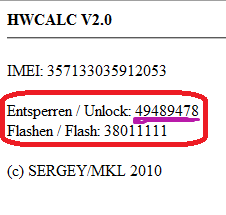
http://bb5.at/huawei.php?imei=357133035912053 

iii. Press Enter key,after you will see like this

 
iv. Now enter this unlock code when it ask the code. you are done. 


2 . Unlock ZTE  HSDPA modems


Some ZTE modems not asking unlock code.so no where to input our code.
so you can't do it like above method.you have to use some software for this.

Download software click here

i. First of all, if you use some memory card, remove it. remove sim  card
   and put sim card what you want to unlock.(it will display invalid sim)

ii.Plug your modem  in to your computer,sometime connection manager will display,close it.

iii. Unzip what you download and open dccrap.exe 

iv. First select the manufacture as ZTE datacards  ( No: 
1)

v. Select the model as Auto detect (recommended)  (No : 
2 ) If you know the model and
     which com port you use.u can do that way also

vi. Click find button  (No: 
3) . after your modem model will display below box

vii. After detect modem click unlock button (No: 
4 )

cheers you are done.After few seconds modem will unlock restart your computer and use
your modem.This connection manager also working for this.
But if you want to use  ZTE connection manager click below link to download.

click here to download.
Thank you.